

 Okay so how can you change the balance of the speaker volume in Windows 7 ?
Recently I had this problem with my earphone it doesn’t produce a balanced output sound anymore. I know that it’s a hardware problem, but fortunately you can adjust this in the software.
Before it use to be pretty simple to change the balance in Windows. But unfortunately in Windows 7 it becomes a little bit hard to find the option.
Here is how you can change the audio balance in Windows 7
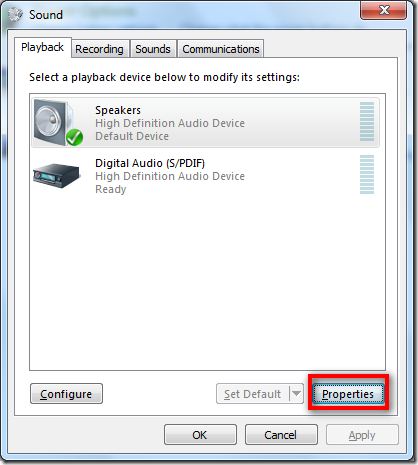
Go to Sound > Properties
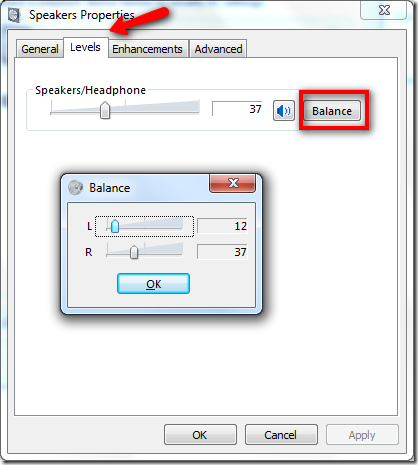
Under “Levels” tab click “Balance”
Now you can adjust the volume for both left and right speaker, adjust them accordingly. Also Windows 7 is smart enough that which audio device this has been adjusted on. If you add a new audio output it will by default change to balanced each.
Was this article Helpful?
Thank you for the feedback!
I'll have to test this out on my other Win7 PC, but I noticed that when you set the balance and adjust the volume, the ratio you set stays the same. Set left to 5, right to 10, turn up volume and left is 8, right is 16. Good. Now, turn down the volume to 0, left and right is 0. Turn up the volume and left and right are both 5. No more balance. I guess the answer is just never turn down the volume to 0. But that's just a work around for a bug.
10 years later the bug is still here
try changing it by one point – it will change itself back to the original value or change the other speaker to match the balance – fuck this.
เปิดเพลงใน Gom ได้ยินแต่ Sound ไม่ได้ยินเสียงนักร้องต้องแก้ไขยังไง บอกด้วย แก้ไม่ได้สักที ปวดหัวจะแย่ช่วยหน่อยนะค่ะ พอเปิดในเครื่องเล่นอื่นก้อเป้นไปด้วย หาวิธีแก้ไม่ได้เลย ใครรู้ว่าแก้ยังไง บอกด้วยนะค่ะ ใช้ windows 7 ค่ะ ด่วนค่ะ ขอบคุณมากมายค่ะ
This is the stupidest software design I have ever seen. To the guy at Microsoft responsible for this: You are an idiot.
Hey There,
Thanks for posting this. I was beating myself up trying to find how to shift the balance after my right speaker blew.
Cheers
glad it help 😛
This is absolutely ridiculous. That isn’t balance, it’s individual speaker volume control. Having a working right speaker and a non-working left means I will never be able to hear the left speaker stuff because once you turn left down to zero it doesn’t automatically go out the right. How can they mess up something so simple now when they’ve gotten that right before!?
I agree. Whoever decided to skip out the very basics of volume control is a fucking idiot.
Some people need to understand the difference between balance and control… This article is to adjust the volume control going to the different speakers, not the balance which means sending the both left and right channels to one speaker or a combination…
Use a product like this to solve your issue. This drives me crazy too. My right speaker is further than my left speaker and I am constantly adjusting the balance to get it right. This will permanently fix the balance control.
Everything is more complicated in Windows 7. Even things that don’t need to be. Like this.
I don’t even have the option to balance on my computer. There is volume, but nothing next to it.
some audio devices may not permit it. If you are hooked up using anything other than built in speakers or something connected to your pc’s default headphone jack, you can expect complications
Thank you for posting this! I was going crazy trying to find this option in my audio device’s menu. I have hearing loss in my right ear, and it makes music more enjoyable to be able to balance the sound out!
nice
thanksss a lot!!! =DD
Good try, however this doesn’t allow the balance of individual applications. One such application is trying to record two different instances of SDR# balancing one to the left and the other to the right. Unfortunately without individual balance controls they both play on top of each other.
Wooooooow Thank you thank you thaaaank you!!!
You saved my life! 😀 <3
Thanks. Very useful.
Thanks a lot 🙂
when i do this and try to adjust left or right, the opposite side automatically changes itself to always be the same volume -_-
Not working. The control all move at the same time 😛 FCUK YOU BILL GATES!
Thanks!
Thank you! Worked perfectly.
Needed help with this issue, and your tip worked perfectly, thanks!
Had to look this up to find this hidden option. After 25 years of development Windows is still crap from a usability viewpoint.
I KNOW..NOTICE HOW EASY ANDROID IS COMPARED TO THIS SHIT..THEY DON’T EVEN HAVE A DECENT SPELL CHECKER..SORRY BOUT CAPS KEYBOARD MESSED UP. WHO AND THIS GUY WANTS ME TO PUT IN A CODE EVERYTIME L TYPE SOMETHING!!! HOLY CRAP REALLY?
Thank you, spot on !!!!
Thanks buddy, that did the trick.
On my system, instead of L and R, it has 1 and 2. I assume that 1 is Left and 2 is Right?
I’d say that’s a safe assumption, try it out and do you hear the difference in the audio output ?
Thank you. Worked perfectly for me too.
thank you for the help
everything comes up exactly as you show and the little slider does nothing as i was sure would be the case.i’m buying a chromebook next..widows just sucks.and with each new version it sucks harder..notice i;m still using 7 in 2017 and would be using windows 95 or 98 if i could
maybe you’re just terrible with technology, W7 is the best of them all.
Thank You So Much!!!
I solved huge problem 🙂
thanks! I keep forgetting windows 7 doesn’t have the control panel shown. have to find in search. I did pin it to my task bar. thanks again. I
On Windows 10, this functions exactly the same, except, on my computer, it locks the “1” and “2” together so when I slide one, the other slides with it, and I can’t make them separate values
not working for me i’m using windows 8.1 pro 64bit. volume balance control not working separately.
Thank u so much though I wasn’t searching for 7 but It also worked and solved my problem , I’m very happy now keep on the good thing